










School of Science and Technology 科技學院
Computing Programmes 電腦學系

Smart Glasses for Hearing-Impaired Communication

Cheng Yui Wang, Li Sin Chiu, Zhou Wenhui, Cheng Wing Choi

Programme Bachelor of Science with Honours in Computing
Supervisor Dr. Jeff Au Yeung Siu Kei
Areas Intelligent Applications
Year of Completion 2026

Objectives

Project Aim

Our target audiences experience significant inconvenience in communication and accessibility. To address these challenges, we aim to develop an application for smart glasses. This application will integrate speaker recognition and sign language recognition, moving beyond simple speech-to-text. The goal is to provide a hands-free, real-time communication solution that supports both hearing-impaired users and tourists, enabling smoother interactions in real time.

Project Objectives

The objectives of this project include: ​

  1. Implement speaker recognition to separate different speakers, label them, and provide the option to include or exclude the wearer's own voice.
  2. Develop sign language recognition using the glasses' camera to detect and interpret simple gestures, converting them into text and spoken output.
  3. Optimize system performance by shifting heavy processing tasks to server-side hosting, reducing heat generation and battery drain while improving accuracy.
  4. Evaluate technical challenges such as environmental sensitivity, microphone range, and filtering overlapping speech in noisy group conversations.
  5. Design a user-friendly interface with features like speaker labeling, gesture-to-speech toggles, and customizable display settings for accessibility.

Videos

Demonstration Video

Presentation Video

Methodologies and Technologies used

Overview of the Solution Early Prototype (Third-Party API)
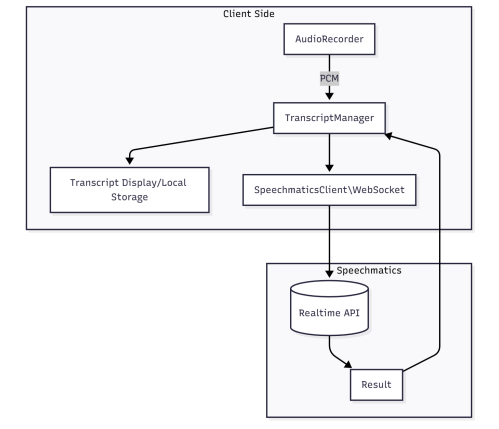
  • Leveraged Speechmatics Realtime API for speech-to-text and speaker diarization
  • Proved feasibility of accurate real-time transcription with native Cantonese support
  • Faced issues: recurring API costs, dependency on external services, and device overheating from local processing
Shift to Server-Side Architecture
  • Migrated STT and sign language recognition workloads from on-device CPU to high-performance server hosting
  • Goals: lower latency, reduced heat and battery drain, full customization for Cantonese and Hong Kong Sign Language, and long-term cost savings
Parallel Development Streams
  • UI & Display Team: Built AR smart-glasses interface with speaker labeling, gesture toggles, and accessibility customization for hearing-impaired users and tourists
  • Recognition & Backend Team: Integrated Pyannote (speaker diarization), Whisper (speech-to-text), SpeechBrain (identity verification), and MediaPipe (sign language recognition); designed server with:
    • GPU-accelerated processing for low-latency tasks
    • WebSocket for real-time audio/text exchange
    • Scalable and secure data handling
Final System Design
  • Client-Server Model:
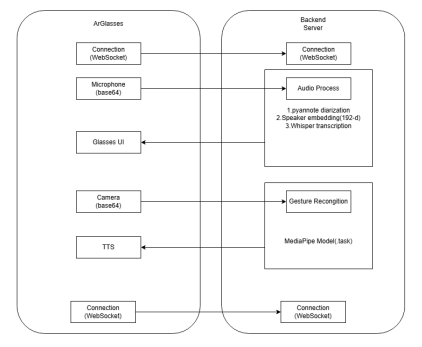
    • Client (Glasses): Captures audio and gestures, streams to server, renders labeled transcriptions and gesture outputs instantly
    • Server: Processes audio with local STT and speaker recognition, interprets sign language gestures, returns text and speech via WebSocket
    • Outcome: A complete, accessible real-time communication solution offering predictable performance, privacy, and cost efficiency for hearing-impaired users and tourists
Hardware Components (Smart Glasses) INMO Air3 glasses
  • Battery: Improved efficiency with lower power consumption due to advanced Snapdragon XR processor
  • Processor and Memory Capacity: Qualcomm 4nm 8-core Snapdragon XR, RAM: 8GB, ROM: 128GB
  • Connectivity Options: Strong wireless connectivity with head-motion tracking for intuitive interaction
  • Audio: Quad-microphone array for superior noise cancellation and speaker separation
  • Displays: Sony 1080p Micro OLED; 36° FOV; crystal-clear AR subtitles without obstructing natural vision
  • Operating System: Lightweight, ergonomic design optimized for all-day wear with advanced AR capabilities
  • Camera: 16MP ultra-wide 120° angle camera for precise first-person sign language capture

Figure 1: System Block Diagram 1 – SpeechMatics API

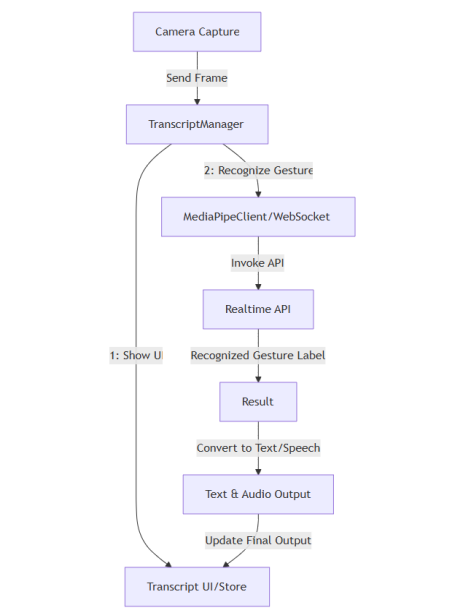
Figure 2: System Block Diagram 2

Results ( Prototype & Final System Design)

Prototype Architecture & System Design Early Prototype (Third-Party API)
  • Deployed Speechmatics Realtime API for speech-to-text and speaker diarization to validate feasibility
  • Audio streamed from the glasses' microphone → Speechmatics API → text returned to OLED display
  • Proved accurate real-time transcription with native Cantonese support
  • Faced issues: recurring API costs, dependency on external services, and device overheating from local processing
Comparative STT Testing
  • Services: Speechmatics vs. Google Speech-to-Text vs. AWS
  • Test conditions: scripted/unscripted dialog, indoor quiet, outdoor noise
  • Findings: Speechmatics outperformed others in Cantonese accuracy and noisy multi-speaker settings
  • Glasses' quad-microphone array proved reliable for speaker separation
Comparative Gesture Recognition Testing
  • Technology: Google MediaPipe Hand Landmarker
  • Test material: controlled gestures vs. cluttered backgrounds
  • Findings: ~75% accuracy in controlled environments; performance improved after server-side hosting and expanded datasets
Final Prototype Stack
  • Transcription: OpenAI Whisper (server-hosted, optimized for Cantonese/English)
  • Speaker Recognition: Pyannote (diarization) + SpeechBrain (identity verification)
  • Sign Language Recognition: MediaPipe-based gesture detection with server-side GPU acceleration
  • Client: Smart glasses capturing audio/gestures, streaming to server via WebSocket
  • Server: Processes audio and gestures, returns labeled text and speech output instantly
  • Display: Real-time captions and gesture-to-speech overlay on AR glasses' OLED
Core Features Implemented Real-Time STT
  • Glasses capture audio and stream it to the server via WebSocket.
  • Processed using OpenAI Whisper for Cantonese/English transcription with low latency.
Speaker Recognition
  • Pyannote performs speaker diarization to separate voices in multi-talker scenarios.
  • SpeechBrain verifies speaker identity and filters out the wearer's own speech.
Sign Language Recognition
  • MediaPipe Hand Landmarker detects 21 hand landmarks in real time.
  • Gestures converted into text overlay and spoken aloud via built-in speakers.
Wearable Subtitle Display
  • AR OLED shows labeled transcripts and gesture outputs clearly without obstructing vision.
  • Minimal UI ensures readability and accessibility for hearing-impaired users.
Basic Controls
  • Start/Stop toggle for speech capture and gesture detection.
  • Options to exclude wearer's voice and customize display settings.
End-to-End Client-Server Pipeline
  • Audio and gesture data streamed to server for GPU-accelerated processing.
  • Validated seamless flow: capture → diarize → transcribe → recognize gesture → display/output.

Figure 3. System architecture of the server-based design

Testing Result
Speaker Recognition

The speaker recognition pipeline successfully separated multiple voices in real-time conversations. Using Pyannote for diarization and SpeechBrain for identity verification, the system achieved accurate speaker labeling and self-voice filtering. Testing showed strong performance in distinguishing speakers, though accuracy decreased slightly in noisy environments. Overall, the feature resolved the “Who is Speaking?” problem and improved dialogue flow for hearing-impaired users.

Sign Language Recognition

Initial testing with MediaPipe Hand Landmarker achieved ~75% accuracy in controlled environments. However, performance was sensitive to lighting and background clutter, and heavy on-device processing caused overheating. After shifting to server-side hosting with expanded datasets, accuracy improved significantly, and battery life was preserved. The system now provides both text overlay and audio output for recognized gestures, enhancing accessibility.

Prototype Evaluation

The integration of third-party APIs validated feasibility but introduced high costs and thermal strain. Transitioning to server-side hosting reduced latency, eliminated recurring API fees, and improved scalability. Word Error Rate (WER) for speech-to-text was ~26.42%, with speaker diarization accuracy around 74.07%. These results demonstrated reliable real-time performance while highlighting areas for further optimization.

Demo Application

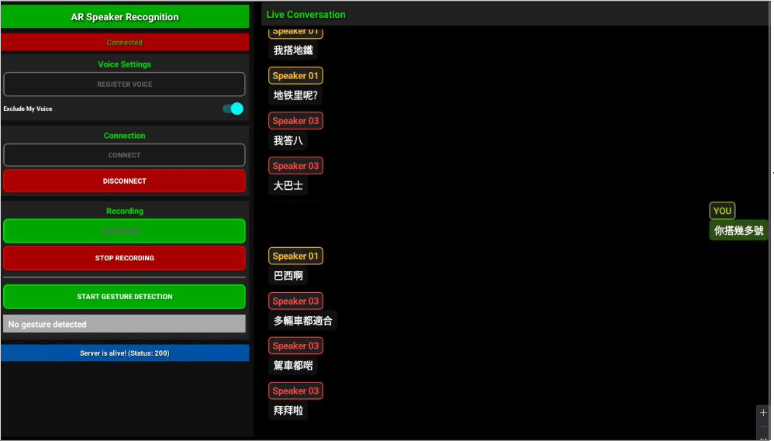
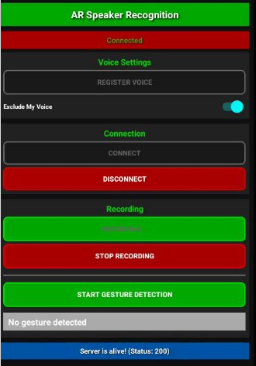
The final prototype showcased both speaker identification and sign language recognition. Subtitles were displayed with labeled speakers, and gestures were converted into text and spoken output. The user interface allowed toggling features such as excluding the wearer's voice and activating gesture detection. Feedback from demonstrations confirmed that the system provided smoother, more accessible communication for hearing-impaired users and tourists.

Figure 4. UI deployed on INMO Air3 for server-based

The interface consisted of six basic buttons:
  • Register Voice – Allows the user to register their own voice profile for identity verification.
  • Connect – Establishes a connection to the server for real-time processing.
  • Disconnect – Terminates the connection to the server.
  • Start Recording – Begins capturing and transmitting audio to the server.
  • Stop Recording – Ends the current audio session.
  • Start Gesture Detection – Activates the sign language recognition module using the front-facing camera.

Figure 5. UI Buttons deployed on INMO Air3 for server-based

Implementation

Deployment Hardware (Remote Server)
  • Device: Remote GPU Server
  • OS: Linux-based environment optimized for AI workloads
  • Processor: High-performance multi-core CPU with NVIDIA GPU acceleration
  • Memory: 64GB RAM, 1TB SSD storage
  • Networking: High-speed Wi-Fi/Ethernet for stable real-time streaming
  • Audio/Video Processing: Handles speech-to-text, speaker diarization, and gesture recognition tasks
  • Scalability: Supports multiple simultaneous users without relying on third-party APIs
Final System Workflow
  • Connection: Smart glasses connect to the remote server via Wi-Fi.
  • Audio Input: Glasses capture speech and stream it to the server.
  • Speaker Recognition: Pyannote separates voices, SpeechBrain verifies identity, Whisper transcribes speech.
  • Gesture Input: MediaPipe detects hand landmarks for sign language recognition.
  • Server Processing: GPU-accelerated server executes STT, diarization, and gesture recognition with low latency.
  • Output: Labeled subtitles and gesture-to-speech displayed instantly on the AR glasses' OLED screen.

Conclusion

The project aimed to provide a solution for hearing-impaired communication by integrating speaker recognition and sign language recognition into smart glasses. The objectives were met, with achievements including server-based architecture deployment, speaker diarization and identity verification, sign language recognition, and user interface development.

Speaker Recognition Implementation
  • Pyannote used for audio segmentation and diarization.
  • Whisper applied for Cantonese/English speech-to-text conversion.
  • SpeechBrain enabled identity verification and filtering of the wearer's own voice.
  • Testing confirmed strong performance in multi-speaker scenarios, resolving the “Who is Speaking?” problem.
Sign Language Recognition Implementation
  • MediaPipe Hand Landmarker detected 21 hand landmarks in real time.
  • Gestures converted into text overlays and spoken aloud via the glasses' speakers.
  • Initial accuracy ~75% in controlled environments, later improved through server-side hosting and expanded datasets.
  • Provided bidirectional communication for hearing-impaired users.
Server-Side Deployment
  • Shifted from third-party APIs to a remote GPU server.
  • Reduced latency, eliminated recurring costs, and improved scalability.
  • Enabled optimized Cantonese STT and robust sign language recognition.
  • Ensured reliable performance without overheating or battery drain on the glasses.
Demo Application Development
  • Developed a responsive AR interface for the smart glasses.
  • Features included speaker labeling, gesture detection toggles, and customizable display settings.
  • Subtitles displayed clearly on the OLED screen; gestures converted into both text and audio output.
  • Demonstrations confirmed smoother, more accessible communication for hearing-impaired users and tourists.

Future Development

The current design of our solution presented several limitations. The word error rate remained at approximately 26.42%, which reduced transcription accuracy to around 73.58%. Speaker diarization achieved an accuracy of about 74.07%, but occasional errors occurred in multi-speaker scenarios, especially in noisy environments. Sign language recognition reached about 75% accuracy in controlled conditions, yet performance was highly sensitive to lighting and background clutter. In addition, on-device processing caused overheating and battery drain during continuous use, while reliance on third-party APIs introduced recurring costs and limited customization.

To address these issues, we suggested several improvements for future work. Expanding the sign language vocabulary to include more gestures and sentence-level detection would enhance bidirectional communication. Incorporating environmental awareness features, such as detecting dangerous sounds like car horns or fire alarms and displaying visual alerts, would improve safety. Integrating multi-modal emotion recognition by combining facial expression analysis with sign language could capture the tone of conversations more effectively. Further optimization of server-side models for Cantonese speech-to-text and Hong Kong Sign Language would improve accuracy in noisy, real-world environments. Finally, developing resource management scripts would balance performance and battery efficiency across devices, ensuring smoother and more reliable operation.