
This website uses cookies so that we can provide you with the best user experience possible. Cookie information is stored in your browser and performs functions such as recognising you when you return to our website and helping our team to understand which sections of the website you find most interesting and useful.
Font Size:
Introduction
Key Features
Uniqueness
Frequently Asked Questions
Open-Source?
Registration Needed?
Installation Required?
AI-empowered?
Specifications
URL:
Country or Region:
Author(s):
License:
Operating System(s):
Language(s):
Registration Needed:
Installation Required:
Video Demonstration
User Guide
This guide outlines how to use ProWritingAid to check grammar, rephrase language, and enhance text readability for clearer and more effective writing.
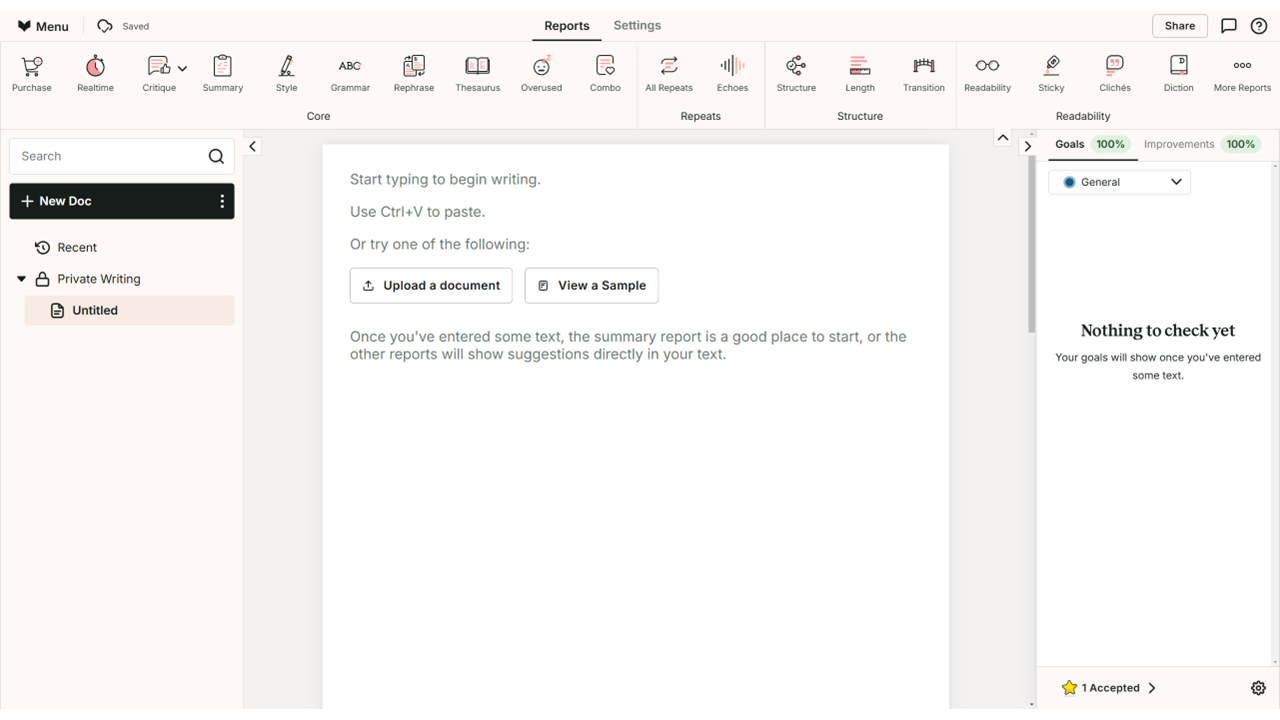
Access ProWritingAid Website
| a. | Navigate to the website: https://app.prowritingaid.com/; |
| b. | Click Sign up to register, or log in to your existing account; |
| c. | Click the + New Doc button to create a new file. |
Check Grammar and Spelling
| a. | Enter text into the editor or click the Upload a document button to select a local document (Note: Supported formats include DOCX, RTF, OD, and FDX; Free plan users can edit the first 500 words); |
| b. | Review the automatically underlined text in your document; |
| c. | Click the Style button in the top toolbar to generate the Writing Style Check report (Note: The Writing Style Check assesses clarity, adverb usage, hidden verbs, and lengthy subordinate clauses; free plan users can generate two Style reports daily); |
| d. | Hover your cursor over any underlined word to view a pop-up with correction details; |
| e. | Click on a suggested correction in the pop-up box or the sidebar to accept the change. |
Rephrase Overused Language
| a. | Click the Overused report button in the top toolbar; |
| b. | Review the list of identified words in the Overused Words Report panel on the left (Note: The Overused Words check compares the frequency of commonly overused words with published writing; free plan users can generate two Overused reports daily); |
| c. | Hover over an underlined word in the main editor to see why it has been flagged; |
| d. | Click the Suggest Rephrases button to view and select replacement options. |
Enhance Readability
| a. | Click the Readability button in the top toolbar; |
| b. | Review the Readability Report in the left-hand panel (Note: The Readability check spots difficult-to-read paragraphs to determine if your writing is suitable for your intended audience; free plan users can generate two Readability reports daily); |
| c. | Examine the colour-coded paragraphs in the main editor, where green is easy to read, yellow is more difficult, and red is most difficult; |
| d. | Click on any listed paragraph in the left-hand panel to navigate directly to it in the editor; |
| e. | Edit the paragraph to improve its readability score. |
Educational Scenarios
Educators' Perspectives
Learners' Perspectives