
This website uses cookies so that we can provide you with the best user experience possible. Cookie information is stored in your browser and performs functions such as recognising you when you return to our website and helping our team to understand which sections of the website you find most interesting and useful.
Font Size:
Introduction
Key Features
Uniqueness
Frequently Asked Questions
Open-Source?
Registration Needed?
Installation Required?
AI-empowered?
Specifications
URL:
Country or Region:
Author(s):
License:
Operating System(s):
Language(s):
Registration Needed:
Installation Required:
Video Demonstration
User Guide
This guide outlines how to download and install Kiwix, access and manage offline content, and save or export articles for future reference. (Reference Version: 2.4.1)
Download and Install Kiwix
| a. | Navigate to the website: https://kiwix.org/en/; |
| b. | Click Download Kiwix Apps and select the installer version that matches your operating system; |
| c. | Run the installer and follow the on-screen instructions to complete the installation; |
| d. | Launch the Kiwix software. |
Download Wikipedia for Offline Use
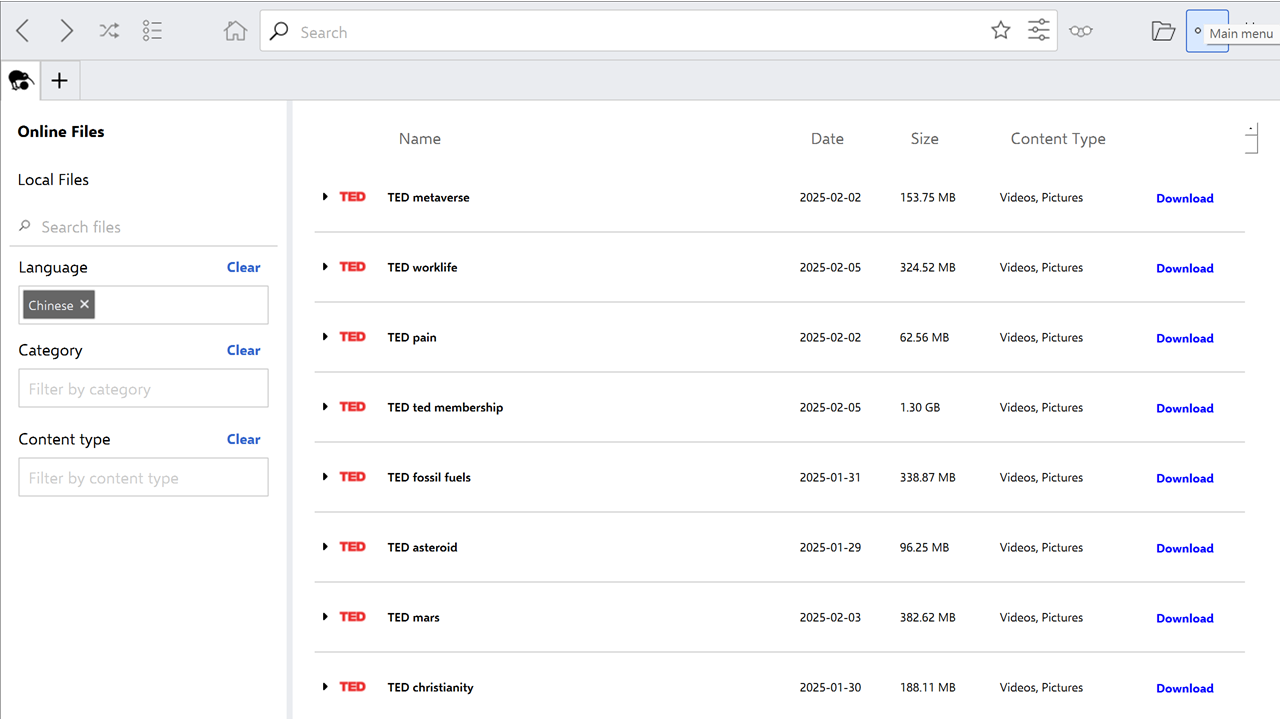
| a. | Click the Online Files tab to browse the library of available offline content; |
| b. | Enter keywords in the Search bar at the top to find specific content; |
| c. | Locate the desired content file from the search results (Note: Pay attention to the file details, as there are often versions with and without images, which affects the file size); |
| d. | Click the Download button next to the content to save it for offline use; |
| e. | Click the Local Files tab to view all downloaded content files; |
| f. | Select a downloaded file and click Open; |
| g. | Use the Search bar within the opened file to find and read specific articles. |
Save and Export Articles
| a. | Navigate to an article to save within an opened content file; |
| b. | Click the Star (Bookmark) icon in the top menu to add the current page to the reading list; |
| c. | Right-click on an opened page and click Save as... from the dropdown menu; |
| d. | Choose a location on the computer to save the PDF file. |
Educational Scenarios
Educators' Perspectives
Learners' Perspectives