
This website uses cookies so that we can provide you with the best user experience possible. Cookie information is stored in your browser and performs functions such as recognising you when you return to our website and helping our team to understand which sections of the website you find most interesting and useful.
Font Size:
Introduction
Key Features
Uniqueness
Frequently Asked Questions
Open-Source?
Registration Needed?
Installation Required?
AI-empowered?
Specifications
URL:
Country or Region:
Author(s):
Availability:
Operating System(s):
Language(s):
Registration Needed:
Installation Required:
Video Demonstration
User Guide
This guide outlines how to use Publish or Perish to find and analyse academic literature, including downloading the software, searching databases, and generating citation reports.
(Reference Version: 8.18.5091.9307)
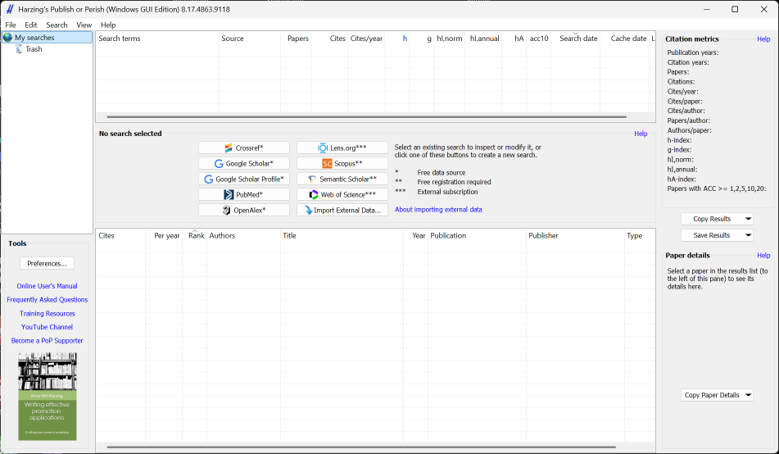
Download and Install Publish or Perish
| a. | Navigate to the website: https://harzing.com/resources/publish-or-perish; |
| b. | Select the installer version that matches your operating system; |
| c. | Run the installer and follow the on-screen instructions to complete the installation; |
| d. | Launch the Publish or Perish software. |
Search Academic Databases
| a. | Launch the Publish or Perish application; |
| b. | Click on a data source, such as CrossRef or Google Scholar, in the main search panel; |
| c. | Enter your search criteria in the available fields, such as Authors or Publication name; |
| d. | Select the maximum number of results to retrieve from the dropdown menu; |
| e. | Click the Search button to initiate the query. |
Generate Citation Reports
| a. | Type a keyword into the filter box and click the Search button to refine the results; |
| b. | Click on any column header, such as Cites or Year, to sort the results; |
| c. | Click the dropdown arrow on the Copy Results button; |
| d. | Select your desired format from the list; |
| e. | Click the dropdown arrow on the Save Results button; |
| f. | Choose the format in which you want to save your data; |
| g. | Specify a file name and choose a save location in the dialog box; |
| h. | Click Save to generate and save the citation report. |
Educational Scenarios
Educators' Perspectives
Learners' Perspectives