|
|
Library Service Update |

ISSUE NO.9 24 August 2004
|
Upcoming Events Library workshop Schedule for Oct 04 semester Need to find set textbooks, reference materials, or past exam papers for your assignments and exams? Please join in the Library Workshops as follows:
Venue Session(s) 02/10/2004
(Sat)
BOC
Theater
Remote Access (w/ demo) 07/10/2004
(Thu)
10/10/2004
(Sun)
Lang Lab
(Library)
Remote Access (w/ demo)
23/10/2004
(Sat)
Lang Lab
(Library)
Introduction
Remote Access (w/ demo)
Do watch out further announcements about more workshops coming up!
|
|||||||||||||||||||||||||||||||
|
Resources Updates
Remark:
If you are not using Campus PC, you
EBSCOhost adds comprehensive Industry Reports and SWOT Analysis in Business Source Premier
Business Source Premier has recently added thousands of reports on Industry Profiles, which cover market overview, value, volume, and segmentation; leading companies and market forecasts for a wide range of industries and SWOT Analysis for public companies.
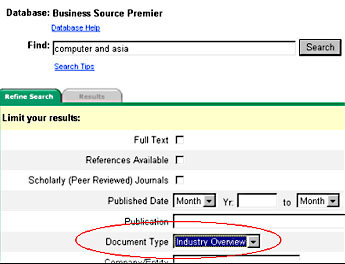
To search for Industry Profiles for a particular industry in a specific region, go to Business Source Premier, key in the industry keyword(s) and select Document Type as "Industry Overview".
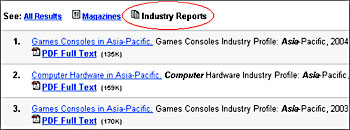
To furthur specify what you need, select "Industry Reports" in the search result (as the screen below), the relevant industry reports will be listed.
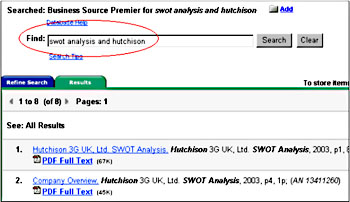
To search for the SWOT Analysis for public companies, type in SWOT Analysis and the name of the company and hit search, a list of relevant results will be displayed.
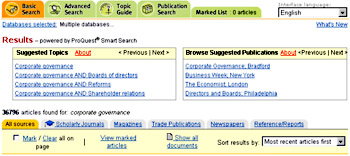
The Smart Search displays suggested topics and publications related to the users' search terms at the top of the search result screen. It aims at helping users focus their searches and get more concrete result.
ABI/INFORM Complete, Accounting & Tax, and Criminal Justice Periodicals Index are on the ProQuest platform.
|
Service Alerts
Get your Library notices through the new OUHK email account
The University is to provide OUHK email accounts to all active students of face-to-face programmes (starting from 20 September 2004), and distance learning and selected LiPACE courses (starting from 1 October 2004). These students, if they are Library users, will receive Library notices as far as applicable through their new OUHK email account. For those who have registered with the email forwarding service, Library notices
will NOT be sent to your personal email accounts once the new service is launched.
Reminder for Course Coordinators: Reserve Materials New reserve materials together with reservation request forms should be submitted four weeks before the Semester begins so that there will allow sufficient time for processing.
Please contact Ms. Kathy Chau at extension 6781 or e-mail: mlchau@ouhk.edu.hk for more details.
Your netLibrary account is expiring by end of September To re-activate the account,
Featured Resources
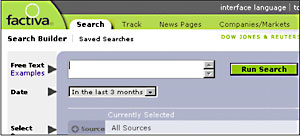
Factiva, a Dow Jones & Reuters Company, covers nearly 9,000 sources, including over 1,500 global newspapers, 3,000 trade journals and magazines, 30,000 company reports, and hundreds of newswires and media programmes from 118countries in 22 languages. For example, you may find popular titles in Factiva including South China Morning Post, Asia Wall Street Journal, Economist, Time, and Business Week.
To access Factiva, go to Electronic Library > Electronic Resources > Keyword Search > type in "Factiva". Or, click here to read the user guide.
|
||||||||||||||||||||||||||||||
|
ISI World of Knowledge interface upgraded Other than a new look and feel, major changes include:
Click here to read our updated user guide.
|
|||||||||||||||||||||||||||||||
|
CONTACT US: Tel: 2768-6777 Email: libwww@ouhk.edu.hk |
|||||||||||||||||||||||||||||||